


Steam Deck owners can now replace the default SteamOS Game Mode home screen with interfaces inspired by the PlayStation 5 and Xbox Series X|S. Two free, community-developed Decky Loader plugins introduce redesigned dashboards, controller-based navigation, game information panels and customizable console-style themes without replacing SteamOS itself.
The projects, named PS5 Dashboard and Xbox Dashboard, are maintained by GitHub user kromossomom-debug. Both are publicly available as open-source projects under the MIT license and use Decky Loader to modify the Steam Deck’s existing interface. Unlike conventional visual themes, the plugins introduce functional home screens and game-library navigation built around users’ Steam libraries.
PS5 Dashboard recreates several recognizable elements of Sony’s PlayStation 5 interface. Its home screen places square game tiles in a horizontal row, with artwork from the selected game filling the background. A prominent Play button appears alongside the game’s title and information about recent activity.
Additional information cards display estimated completion times from HowLongToBeat, total playtime, Steam review scores, Metacritic ratings, installation size and achievement progress. Players can also access their game libraries through a redesigned grid containing filters for installed games, favorites, non-Steam shortcuts and custom collections.
The PlayStation-inspired interface includes separate Games and Media tabs, accessible using the L1 and R1 buttons. Its styling extends beyond the home screen to Steam’s menus, buttons and Quick Access interface, incorporating PlayStation-inspired colors, rounded panels and animated transitions.
Customization options include alternative accent colors based on PlayStation consoles and DualSense controllers, adjustable tile corners, background styles and focus effects. Users can also disable individual visual modifications while keeping other features enabled.
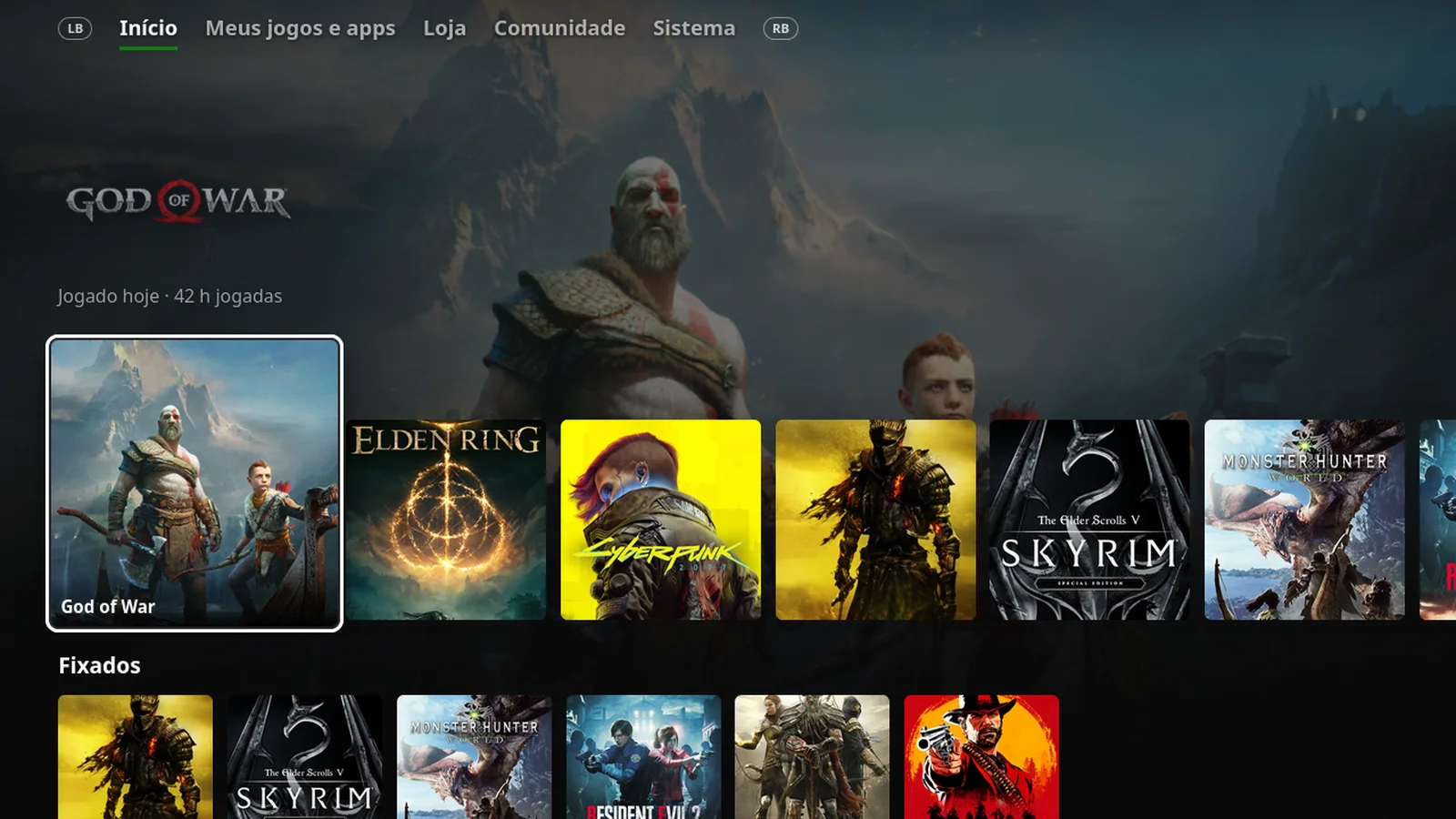
Xbox Dashboard takes a different approach, recreating the layout and navigation conventions of Microsoft’s Xbox Series X|S interface. Its home screen emphasizes recently played games, large background artwork and customizable rows for pinned titles, installed games and shortcuts.
The plugin provides five navigation sections: Home, My games & apps, Store, Community and System. Players can switch between sections using the LB and RB buttons, while pressing Y on a selected game opens a dedicated information page.
These game pages include Steam Deck compatibility information, installation options, achievement progress, HowLongToBeat estimates and shortcuts to Steam’s existing game-management features. Pressing X allows users to pin or unpin games from the home screen.
Xbox Dashboard also introduces Xbox-inspired green and gray interface colors, Guide-style menus and configurable home-screen layouts. Users can select which collections appear prominently, hide individual games and adjust the interface’s accent colors, backgrounds and visual effects.
Both plugins operate within SteamOS Game Mode and retain access to Steam’s existing library and game-management functionality. They do not emulate PlayStation or Xbox hardware, enable native console game execution or independently add Xbox Game Pass support.
The projects are particularly relevant to players interested in customizing the software experience of Valve’s handheld. Steam Deck compatibility remains a separate consideration for individual games, including titles such as Queen's Domain, which received Steam Deck Verified status ahead of its October 30 launch.
Installing either dashboard requires Decky Loader, the community plugin framework for SteamOS. After installing Decky Loader, users must download the appropriate dashboard ZIP package from the developer’s GitHub repository. Within Game Mode, they can open Quick Access, navigate to Decky’s settings, enable Developer mode under General and select the option to install a plugin from a ZIP file.
The developer recommends enabling only one dashboard replacement at a time. Running PS5 Dashboard alongside Xbox Dashboard or another CSS Loader theme that modifies the SteamOS home screen can cause styling and interface conflicts.
There are also compatibility considerations. Both projects depend on Steam’s interface components, which can change following Steam client updates. The PS5 Dashboard documentation warns that these changes may temporarily prevent parts of the theme from applying until the plugin receives an update. Its replacement home screen is designed to fall back to Steam’s original interface if it fails to render.
HowLongToBeat information is retrieved through game-name matching, meaning completion estimates may not appear for every title. Non-Steam shortcuts can also lack the achievement and review information available for Steam games.
The Xbox implementation is still in alpha development, with an October 28 release identified as version 0.0.9-alpha. Its early development status means users should expect possible bugs and compatibility changes as the project evolves.
Neither dashboard is an official Sony, Microsoft or Valve product. Both provide optional alternatives to SteamOS’s standard home screen, allowing players to adopt PlayStation- or Xbox-style navigation while continuing to use their existing Steam games and libraries.
