


Hardware enthusiast TrashBench has repurposed a radiator from an old 4-kW Fujitsu air conditioner into a custom PC liquid-cooling system, reducing an Nvidia GeForce RTX 3080’s operating temperature from approximately 65°C to 28°C. The experiment also tested an RTX 5060 and Intel Core i9-14900K, demonstrating substantial thermal improvements but relatively modest gains in gaming performance.
The Australian YouTube creator documented the modification in a video titled “I Made a Radiator From an Old AC. GPU Temps Dropped 39°C.” Rather than using the air conditioner’s original refrigeration system, TrashBench converted its outdoor radiator and fan assembly into part of a conventional water-cooling loop.
The build involved removing unnecessary components from the old air-conditioning unit, incorporating a coolant reservoir and pump, and adapting the hardware for use with desktop PC components. TrashBench also fabricated custom mounting hardware, including 3D-printed brackets for the cooling blocks, and modified tubing connections to accommodate the experimental setup.
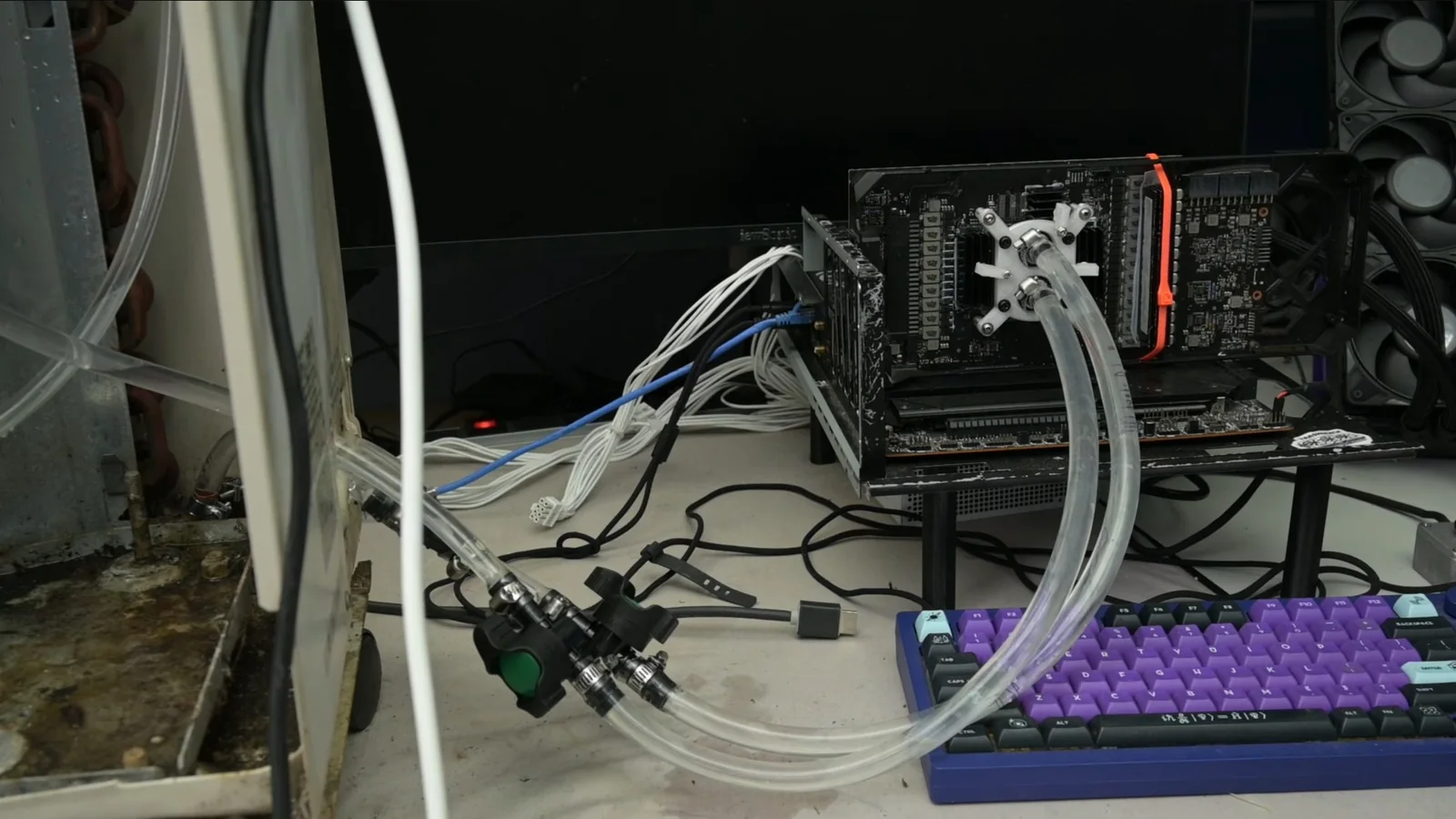
The first graphics card tested was Nvidia’s GeForce RTX 5060. With its standard cooling solution, the GPU operated at approximately 52°C. Connecting it to the oversized radiator reduced the reported temperature to around 33°C.
TrashBench subsequently increased the RTX 5060’s boost clock from approximately 2,902 MHz to 3,300 MHz, representing an increase of nearly 14%. However, the additional frequency translated into only about 3% higher average gaming frame rates in the creator’s testing.
The results demonstrated that significantly reducing GPU temperatures does not necessarily translate into proportional gaming performance improvements. The RTX 5060’s relatively modest power consumption also meant that the experimental cooling system had considerably more thermal capacity than the card required.
To test a more demanding graphics card, TrashBench switched to the GeForce RTX 3080. Under the reported comparison conditions, its GPU temperature dropped from approximately 65°C with conventional cooling to just 28°C using the modified air-conditioner radiator, a reduction of roughly 37°C.
Additional measurements placed the RTX 3080’s hotspot temperature at approximately 42.2°C, compared with 79.4°C before the cooling modification. These results indicate that the custom loop substantially reduced both the reported GPU operating temperature and the temperature of its hottest monitored region.
The additional thermal headroom allowed TrashBench to push the RTX 3080 beyond its standard operating limits. During overclocking experiments, the card reportedly reached a core frequency of 2,130 MHz while drawing approximately 459W, considerably above its typical 320W to 350W power range.
Despite the substantial increase in cooling capacity and power consumption, the RTX 3080 delivered only around 3% additional gaming performance in the demonstrated tests.
The modest gains provide a useful contrast with other experimental GeForce modifications, including modifications targeting RTX Tensor Core performance. Those experiments focus on computational capabilities, while TrashBench’s latest project examines the relationship between cooling capacity, GPU clock speeds and gaming frame rates.
TrashBench also connected an Intel Core i9-14900K to the cooling system to examine its ability to handle a demanding processor alongside a graphics card.
In a processor-focused test, the modified cooling arrangement reportedly reduced CPU temperature by approximately 18°C to around 76°C. However, a separate combined CPU and GPU workload produced a much smaller CPU temperature reduction, from approximately 74.8°C to 71.7°C while the processor operated at around 230W.
TrashBench suggested that the limited improvement during the combined workload could have resulted from inadequate contact between the processor and its water block. The GPU continued to demonstrate substantial cooling performance, suggesting that the radiator itself was not necessarily the limiting factor.
The experiment also exposed practical drawbacks. The pump used in the modified system was reportedly extremely noisy, while the oversized external assembly required considerably more space and custom fabrication than a conventional desktop liquid cooler.
The 4-kW rating refers to the air-conditioning equipment from which the radiator was salvaged, rather than a measured cooling capacity for the modified PC loop. The reported temperatures and performance figures reflect TrashBench’s particular hardware, operating conditions and custom installation, and should not be treated as generally reproducible results.
For PC cooling enthusiasts, the experiment demonstrates how much thermal capacity can be obtained from repurposed equipment. It also illustrates an important limitation of extreme GPU cooling: removing tens of degrees from operating temperatures can create substantial overclocking headroom without delivering an equally significant improvement in gaming frame rates.
