
Close Menu
    Facebook X (Twitter) Instagram
    Facebook X (Twitter) Instagram
    TechtroduceTechtroduce
    Subscribe
    • NEWS
    • GUIDES
    • COMPARISONS
    • REVIEWS
    TechtroduceTechtroduce
    Home » RTX Lens Monitors RTX 5090 and RTX 5080 Power Connector Pins
    NEWS Updated:November 24, 2026

    RTX Lens Monitors RTX 5090 and RTX 5080 Power Connector Pins

    Abyan KhanBy Abyan KhanNovember 24, 2026Updated:November 24, 2026No Comments3 Mins Read
    Facebook Twitter Pinterest LinkedIn Tumblr Email
    Share
    Facebook Twitter LinkedIn Pinterest Email

    Independent developer Codeh4ck has released RTX Lens, a free and open-source monitoring application designed to detect potentially dangerous current imbalances across 12V-2×6 GPU power connectors. The software supports compatible ASUS graphics cards, Thermal Grizzly monitoring devices and selected MSI power supplies.

    The developer, who owns two GeForce RTX 5090 graphics cards, created the application in response to concerns surrounding melting GPU power connectors. The project’s official GitHub repository and public announcement detail a range of monitoring features, configurable alerts and an optional automatic system shutdown.

    Unlike conventional GPU monitoring utilities that primarily display total power consumption, RTX Lens can monitor the electrical current flowing through individual power pins when connected to compatible hardware.
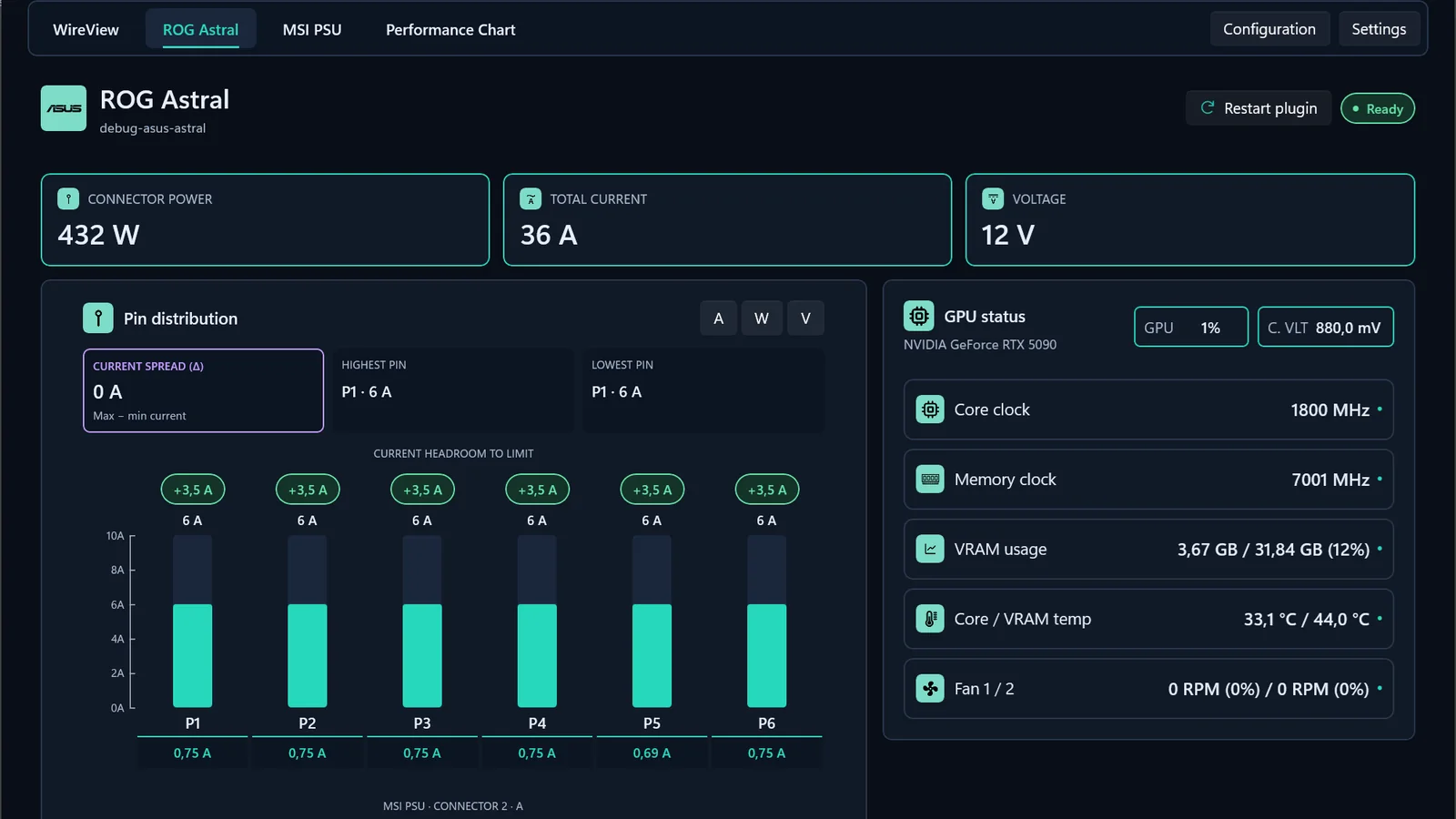
    RTX Lens monitoring dashboard displaying GPU and PSU power readings

    The 12V-2×6 connector distributes power across six 12V pins. If one connection carries significantly less current than the others, the remaining connections can experience increased electrical loads. This means potentially dangerous imbalances may occur even when overall GPU power consumption remains within expected limits.

    RTX Lens currently supports direct per-pin monitoring on ASUS ROG Astral GeForce RTX 5080 and RTX 5090 graphics cards. Owners of other graphics card models can access similar monitoring capabilities through the Thermal Grizzly WireView Pro II, which sits between the graphics card and its power cable.

    The application also supports MSI MPG Ai1300TS and MPG Ai1600TS power supplies. Combining a compatible power supply with a supported graphics card or WireView Pro II allows users to compare measurements from both ends of the power cable.

    Users can configure warning thresholds for excessive temperatures, current levels and uneven power distribution. If a warning remains active beyond a specified duration, RTX Lens can initiate an automatic Windows shutdown.

    Monitoring continues through a background service even when the desktop application is closed. Users can also record sensor data during gaming sessions or benchmarks, allowing them to examine changes in power consumption and current distribution under sustained workloads.

    Additional functionality includes conventional GPU telemetry, configurable MSI power supply fan curves and access to WireView Pro II settings. Companion applications for Android and iOS provide remote monitoring and warning notifications, while a dedicated widget supports the Corsair Xeneon Edge display.

    Per-pin monitoring remains dependent on physical sensors. Installing RTX Lens on an unsupported graphics card does not enable individual current measurements, although conventional GPU statistics remain accessible through NVIDIA’s existing telemetry interfaces.

    The automatic shutdown feature also relies on Windows rather than independently disconnecting electrical power. Consequently, the application cannot guarantee protection against connector overheating or damage.

    RTX Lens is available through GitHub under the LGPL 3.0 open-source license and supports compatible 64-bit installations of Windows 10 and Windows 11. The developer describes the project as being in an early development phase, with further hardware support and monitoring improvements planned.

    Share. Facebook Twitter Pinterest LinkedIn Tumblr Email
    Abyan Khan
    • Instagram
    • LinkedIn

    Abyan Khan is a dedicated writer and tech enthusiast currently pursuing a Bachelor’s degree in Information Technology. With over 3 years of professional writing experience, he specializes in crafting clear, engaging, and informative content across a range of topics, particularly in the tech and gaming industries. Abyan combines his academic knowledge with real-world insights to deliver articles that are both well-researched and reader-friendly.

    Related Posts

    Fluffy Hot Spring Bathhouse Life Sim Announced for PC

    November 24, 2026

    Samsung Reportedly Plans Major NAND Flash Production Expansion

    November 24, 2026

    Samsung Launches 1100Hz Odyssey G6 Gaming Monitor for $899

    November 24, 2026
    Leave A Reply Cancel Reply

    Google Techtroduce

    See more Techtroduce stories on Google.

    Add us on Google

    • RTX Lens Monitors RTX 5090 and RTX 5080 Power Connector PinsNovember 24, 2026
      RTX Lens is a free, open-source Windows tool offering per-pin GPU power monitoring, configurable warnings and automatic shutdown on compatible hardware.
    • Fluffy Hot Spring Bathhouse Life Sim Announced for PCNovember 24, 2026
      Fluffy Hot Spring is coming to Steam, combining bathhouse management, farming, exploration, crafting and village restoration.
    • Samsung Reportedly Plans Major NAND Flash Production ExpansionNovember 24, 2026
      Samsung reportedly plans to expand V9 NAND production to 50,000–60,000 wafers per month by November 2027, potentially easing SSD supply constraints.
    TRENDING NOW

    GTA 6 PC Recompilation Project Leonida Makes Early Progress

    NVIDIA RTX Remix 1.6 Adds DLSS 5 and Minecraft Java RTX Beta

    Unknown Worlds Lawsuit Against Krafton: A Battle Over Subnautica 2 and Developer Rights

    Kirby Air Riders Replacement Event Starts November 4

    Facebook Instagram YouTube
    © 2026 Techtroduce. All Rights Reserved | Cookies Policy | Privacy Policy | Contact Us | About Us | Corrections Policy

    Type above and press Enter to search. Press Esc to cancel.

    Manage Consent
    To provide the best experiences, we use technologies like cookies to store and/or access device information. Consenting to these technologies will allow us to process data such as browsing behavior or unique IDs on this site. Not consenting or withdrawing consent, may adversely affect certain features and functions.
    Functional Always active
    The technical storage or access is strictly necessary for the legitimate purpose of enabling the use of a specific service explicitly requested by the subscriber or user, or for the sole purpose of carrying out the transmission of a communication over an electronic communications network.
    Preferences
    The technical storage or access is necessary for the legitimate purpose of storing preferences that are not requested by the subscriber or user.
    Statistics
    The technical storage or access that is used exclusively for statistical purposes. The technical storage or access that is used exclusively for anonymous statistical purposes. Without a subpoena, voluntary compliance on the part of your Internet Service Provider, or additional records from a third party, information stored or retrieved for this purpose alone cannot usually be used to identify you.
    Marketing
    The technical storage or access is required to create user profiles to send advertising, or to track the user on a website or across several websites for similar marketing purposes.
    • Manage options
    • Manage services
    • Manage {vendor_count} vendors
    • Read more about these purposes
    View preferences
    • {title}
    • {title}
    • {title}