
Close Menu
    Facebook X (Twitter) Instagram
    Facebook X (Twitter) Instagram
    TechtroduceTechtroduce
    Subscribe
    • NEWS
    • GUIDES
    • COMPARISONS
    • REVIEWS
    TechtroduceTechtroduce
    Home » Windows 11 Search Gains PC Controls and Steam Launch Support
    NEWS Updated:November 2, 2026

    Windows 11 Search Gains PC Controls and Steam Launch Support

    Abyan KhanBy Abyan KhanNovember 2, 2026Updated:November 2, 2026No Comments4 Mins Read
    Facebook Twitter Pinterest LinkedIn Tumblr Email
    Share
    Facebook Twitter LinkedIn Pinterest Email

    Microsoft has expanded Windows 11 Search with new controls that let users adjust system settings, launch applications and perform other desktop actions directly from the search interface. The improvements are rolling out through Windows 11 Insider Experimental Preview Build 26340.9843, released on October 30, 2026, with independent testing confirming that the interface can launch applications including Steam.

    The update builds on Microsoft’s redesigned Windows 11 Search experience, which began rolling out earlier in October. Rather than simply finding files, applications and settings, the new interface allows users to perform supported tasks through search queries without navigating through separate menus.

    The most significant addition is an expanded set of inline actions. Users can adjust system volume, screen brightness and mouse cursor size using sliders displayed directly within Windows Search. Microsoft has also improved action labels and introduced suggestions to help users discover available commands.
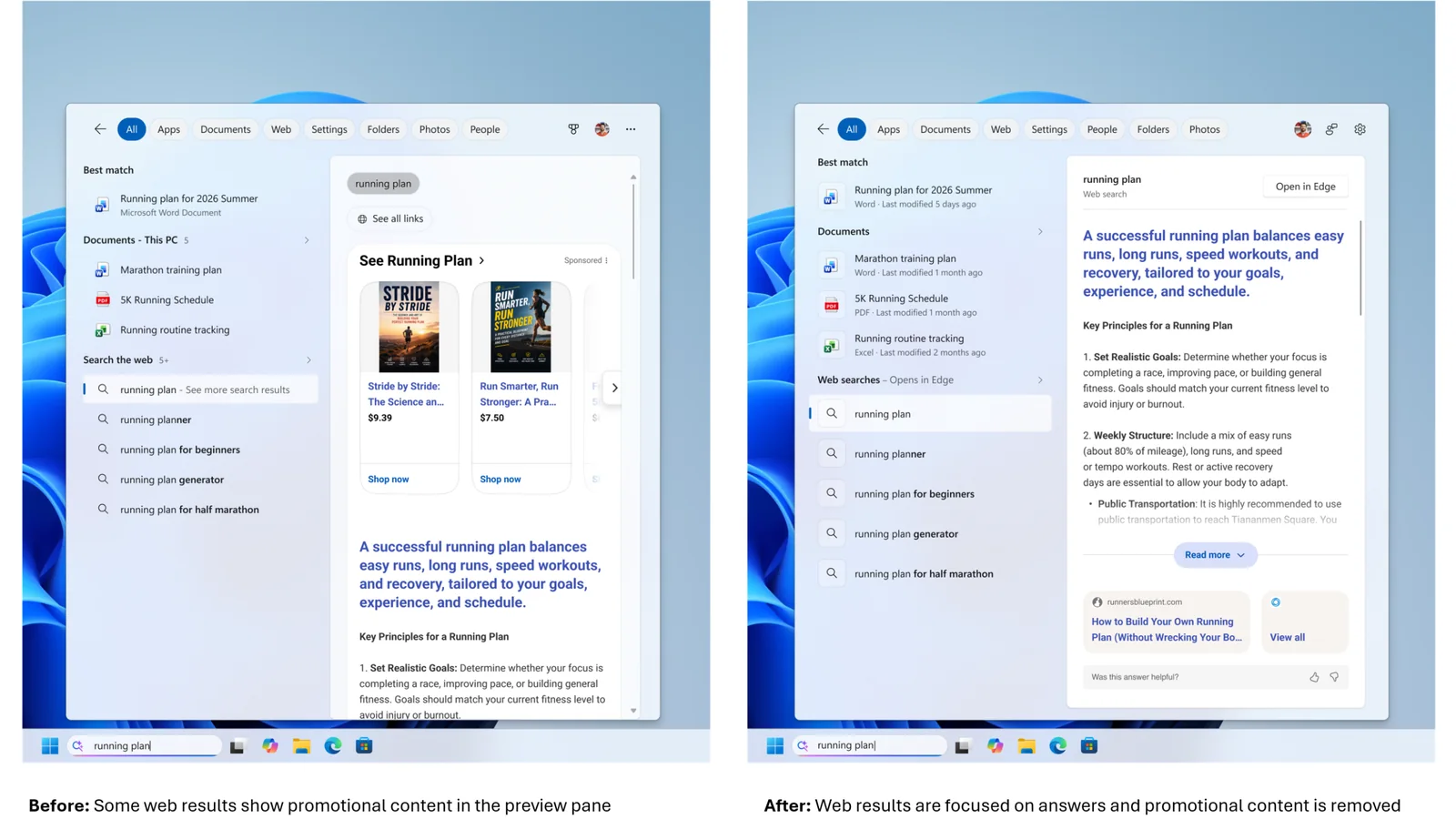
    Official Microsoft before-and-after comparison showing Windows 11 Search results with a cleaner interface, document

    For example, searching for a specific volume level can bring up an actionable result that changes the setting. The inline sliders provide another way to make adjustments without opening the main Windows Settings application.

    ComputerBase independently tested the updated interface in the Experimental build and confirmed that several actions work. Its hands-on testing demonstrated the ability to launch Word and Steam, lock the desktop, set a specific volume level and capture screenshots. Document previews also functioned during testing.

    However, the implementation remains incomplete. ComputerBase found that switching from dark mode to light mode did not work through the new Search interface, indicating that some actions are still unsupported or unreliable in the preview.

    Microsoft is also introducing Phone Link integration directly into Search. Users with compatible Android phones connected to their PCs can initiate calls, send text messages and access phone controls such as Do Not Disturb. According to Microsoft’s release notes, iPhone support is planned for early 2027.

    Beyond system controls, the interface now offers richer results for local files and online information. Document previews can display information including the file’s location, author and last modification date. Search can also show answers for weather, stock prices and other factual queries, alongside applications and games available through the Microsoft Store.

    Additional filters allow users to narrow results by categories such as Files & Folders, Settings and Actions. Results and suggestions can receive positive or negative feedback through a right-click menu, while unwanted items can be removed from the initial Search view.

    For PC gamers, the ability to launch Steam through a search command is a practical example of the new interface’s application controls. The expanded volume and display settings could also make routine desktop adjustments more convenient. Microsoft has not announced any gaming performance improvements associated with these Search changes.

    The same Experimental build introduces a separate gaming-focused improvement: Quick Settings access from the Gaming Task View navigation bar in Xbox mode. This allows users to reach the Windows taskbar’s full set of Quick Settings without leaving Xbox mode.

    The Search changes are part of Microsoft’s broader Windows 11 development efforts, which also include reducing Windows 11 memory usage on consumer PCs.

    For now, the redesigned Search experience remains limited to the Windows Insider Experimental channel and is being distributed gradually. Microsoft says eligible Insiders can access the experimental feature through Settings, Windows Update, Windows Insider Program and Feature flags.

    ComputerBase activated the interface using the third-party ViVeTool utility for its testing, demonstrating that the functionality can be present in a build even when it has not yet been enabled for a particular system.

    Microsoft has not provided a general release date for the expanded Search controls. As with other Experimental channel features, availability and functionality may change during testing, and inclusion in an Insider build does not guarantee a future public release.

    Share. Facebook Twitter Pinterest LinkedIn Tumblr Email
    Abyan Khan
    • Instagram
    • LinkedIn

    Abyan Khan is a dedicated writer and tech enthusiast currently pursuing a Bachelor’s degree in Information Technology. With over 3 years of professional writing experience, he specializes in crafting clear, engaging, and informative content across a range of topics, particularly in the tech and gaming industries. Abyan combines his academic knowledge with real-world insights to deliver articles that are both well-researched and reader-friendly.

    Related Posts

    Phantom Blade Zero Hits 833,921 Concurrent Players on Steam

    November 2, 2026

    50 AI Agents Fail to Build Thriving Minecraft Civilization

    November 1, 2026

    Rufus 4.16 Beta Fixes UEFI NTFS Validation Bug on PCs

    November 1, 2026
    Leave A Reply Cancel Reply

    Google Techtroduce

    See more Techtroduce stories on Google.

    Add us on Google

    • Windows 11 Search Gains PC Controls and Steam Launch SupportNovember 2, 2026
      Windows 11 Insider Build 26340.9843 expands Search with volume and brightness controls, Steam launching, Phone Link actions and richer results.
    • Phantom Blade Zero Hits 833,921 Concurrent Players on SteamNovember 2, 2026
      Phantom Blade Zero reaches 833,921 concurrent Steam players, extending its launch record as positive user reviews approach 90%.
    • 50 AI Agents Fail to Build Thriving Minecraft CivilizationNovember 1, 2026
      Y Combinator's 50 AI agents struggled to survive in Minecraft, forming a bureaucracy instead of a thriving civilization during a three-hour test.
    TRENDING NOW

    Insomniac Games Is Not Ready To Reveal Wolverine Right Now

    Grand Theft Auto 5 Lester Says $100 Price Tag Is Justified For GTA 6

    Xbox CEO Asha Sharma Personally Handles Player Support Tickets

    Left 4 Dead RTX Brings Ray Tracing and DLSS 4.5 to Left 4 Dead 2

    Facebook Instagram YouTube
    © 2026 Techtroduce. All Rights Reserved | Cookies Policy | Privacy Policy | Contact Us | About Us | Corrections Policy

    Type above and press Enter to search. Press Esc to cancel.

    Manage Consent
    To provide the best experiences, we use technologies like cookies to store and/or access device information. Consenting to these technologies will allow us to process data such as browsing behavior or unique IDs on this site. Not consenting or withdrawing consent, may adversely affect certain features and functions.
    Functional Always active
    The technical storage or access is strictly necessary for the legitimate purpose of enabling the use of a specific service explicitly requested by the subscriber or user, or for the sole purpose of carrying out the transmission of a communication over an electronic communications network.
    Preferences
    The technical storage or access is necessary for the legitimate purpose of storing preferences that are not requested by the subscriber or user.
    Statistics
    The technical storage or access that is used exclusively for statistical purposes. The technical storage or access that is used exclusively for anonymous statistical purposes. Without a subpoena, voluntary compliance on the part of your Internet Service Provider, or additional records from a third party, information stored or retrieved for this purpose alone cannot usually be used to identify you.
    Marketing
    The technical storage or access is required to create user profiles to send advertising, or to track the user on a website or across several websites for similar marketing purposes.
    • Manage options
    • Manage services
    • Manage {vendor_count} vendors
    • Read more about these purposes
    View preferences
    • {title}
    • {title}
    • {title}